開発環境
- Unity 2018.2.6f1
- Scripting Runtime Version*
.NET 4.x.Equivalent- .NET 3.5
でも動くはず推奨です
- .NET 3.5
- Api Compatibility Level* .NET Standard 2.0
- Scripting Runtime Version*
- OpenCVSharp3 4.0.0
- Windows10 Home (64bit)
準備
- このサイトを参考にしてArUco用のマーカを用意してください
- http://pongsuke.hatenadiary.jp/entry/2017/06/09/122312
- 僕は4X4_50で0~4番を作成し,印刷しました
マーカ検出
CvAruco.DetectMarkers- この1行だけで,フレーム内から指定したARマーカ辞書と一致するマーカを検出します.
CvAruco.DrawDetectedMarkers- この行で,検出されたマーカのIDと座標,輪郭の描画を行います.ちゃんと検出されているかを視覚的に確認するメソッドです.
- ソースコード
- 以下のプログラムをUnity上の適当なオブジェクトにアタッチしてください.
using System.Collections;
using System.Collections.Generic;
using UnityEngine;
using OpenCvSharp;
using OpenCvSharp.Aruco;

public class webcam : MonoBehaviour {

    private int source = 0; //カメラのインデックス

    private VideoCapture cam;
    public Mat cam_frame;

    /* ArUcoの設定 */
    //ARマーカ辞書の設定
    private const PredefinedDictionaryName dictName = PredefinedDictionaryName.Dict4X4_50;
    private Dictionary ar_dict;
    //検出アルゴリズムの設定
    private DetectorParameters detect_param;

    void Start () {
        cam = new VideoCapture(source);
        cam.Set(CaptureProperty.ConvertRgb,3);
        cam_frame = new Mat();

        ar_dict = CvAruco.GetPredefinedDictionary(dictName);
        detect_param = DetectorParameters.Create();
    }

    void Update () {

        Point2f[][] maker_corners;  //ARマーカのカドの座標
        int[] maker_ids;            //検出されたARマーカのID
        Point2f[][] reject_points;

        cam.Read(cam_frame);//フレームの更新

        //ARマーカの検出
        CvAruco.DetectMarkers(cam_frame, ar_dict, out maker_corners, out maker_ids, detect_param, out reject_points);

        if(maker_ids.Length > 0){
            //検出されたマーカ情報の描画
            CvAruco.DrawDetectedMarkers(cam_frame, maker_corners, maker_ids, new Scalar(0, 255, 0));
        }
    }
}
描画
using System.Collections;
using System.Collections.Generic;
using UnityEngine;

public class camtexture_cam : MonoBehaviour {

    public webcam _webcam;
    private Texture2D cam_Texture;

    void Start () {
        cam_Texture = new Texture2D(
            640,    //カメラのwidth
            480,    //カメラのheight
            TextureFormat.YUY2, //フォーマットを指定
            false               //ミニマップ設定
        );
        this.GetComponent<Rendere>().material.mainTexture = cam_Texture;
    }

    // Update is called once per frame
    void Update () {
        cam_Texture.LoadImage(_webcam.cam_frame.ImEncode());
    }
}
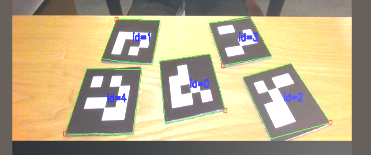
ノートパソコンのインカメで撮影したので,少し不自然な角度ですがしっかりマーカの検出ができていることが確認できます.
ArUcoマーカーの検出は理解できました。この上にオブジェクトを置く場合はどのようなソースコードになるか教えていただけると幸いです。